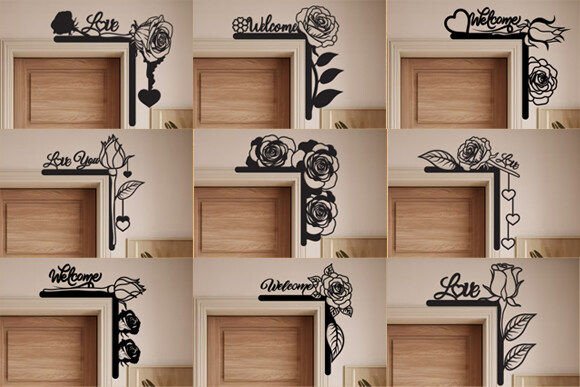
Laser Cut Rose Door Corner SVG
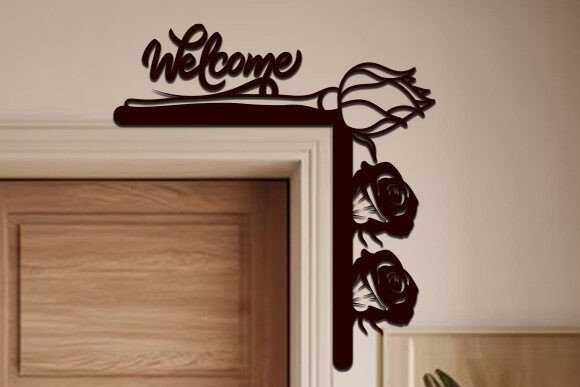
The Laser Cut Rose Door Corner SVG is a digital design file that allows users to create intricate, detailed door corner pieces using a laser cutting machine. This design is ideal for those looking to add a touch of elegance and artistry to their home decor or custom furniture projects. Whether you're a professional woodworker, a DIY enthusiast, or an entrepreneur offering custom-made items, this SVG file can be a valuable addition to your workflow.
SVG files are scalable vector graphics that maintain clarity at any size, making them perfect for precise laser cutting. The Laser Cut Rose Door Corner SVG is just one of the many formats included in the download package, which also contains AI, EPS, DWG, DXF, PNG, and JPG files. These additional formats ensure compatibility with various design and cutting software, allowing for greater flexibility in how you use the design.
What You Will Get in the Zip File
The zip file includes multiple file types to suit different needs and software preferences. Here's a breakdown of what you'll find:
- AI (Adobe Illustrator): Ideal for advanced graphic design and editing.
- EPS (Encapsulated PostScript): A versatile format compatible with most vector-based software.
- SVG (Scalable Vector Graphics): Perfect for web use and laser cutting due to its scalability and precision.
- DWG (AutoCAD Drawing): Useful for architectural and engineering applications.
- DXF (Drawing Exchange Format): Commonly used in CNC and laser cutting machines.
- PNG (Portable Network Graphics): Great for visual references and documentation.
- JPG (Joint Photographic Experts Group): Suitable for quick previews and sharing.
Having access to these different file types ensures that you can work with the design in the way that best fits your tools and project requirements. This variety also makes it easier to collaborate with others or transition between different stages of a project.
How to Use the Laser Cut Rose Door Corner Design
Using the Laser Cut Rose Door Corner SVG involves a few straightforward steps that can be integrated into your existing workflow. Here's a practical guide on how to get started:
- Download and Extract: Begin by downloading the zip file to your computer. Once downloaded, extract the contents to a folder where you can easily access them.
- Upload to Cutting Software: Open your preferred laser cutting software and import the SVG file. Make sure to adjust the settings according to your machine's specifications, such as material thickness and cutting speed.
- Prepare Layers: The design may consist of multiple layers that need to be cut separately. Ensure each layer is correctly positioned and labeled so that you can stack them in the right order later.
- Cut Each Layer: Use your laser cutting machine to cut each layer individually. It’s important to test the settings on a small piece of material first to ensure accuracy and avoid errors.
- Assemble the Final Piece: Once all layers are cut, stack them in the correct sequence as indicated in the design instructions. This will bring the Laser Cut Rose Door Corner to life, creating a three-dimensional effect that adds depth and detail.
By following these steps, you can efficiently incorporate the Laser Cut Rose Door Corner SVG into your projects, whether you're working on a single piece or a larger batch of custom designs.
Integrating the Design into Your Workflow
The Laser Cut Rose Door Corner SVG can be used at various stages of a project, depending on your specific goals. For instance, it can serve as a reference during the planning phase, helping you visualize the final product before committing to any material. It can also be used during the execution phase to guide your cutting process, ensuring consistency and precision across multiple pieces.
When working on a larger project, such as custom furniture or interior design elements, the SVG file can be part of a broader set of design assets. You might combine it with other vector files or 3D models to create a cohesive look. Additionally, having the design in multiple formats allows for seamless integration with different tools and platforms, making it easier to share with clients or collaborators.
For entrepreneurs or small business owners, the Laser Cut Rose Door Corner SVG can be a valuable asset in offering unique, customizable products. By incorporating this design into your product line, you can differentiate your offerings and cater to customers who appreciate handcrafted, artistic details. This can lead to increased customer satisfaction and repeat business.
Practical Tips for Implementation
To make the most of the Laser Cut Rose Door Corner SVG, consider the following tips:
- Plan Ahead: Before starting, take time to understand the design and how it will fit into your project. This includes considering the materials you’ll use and the tools you have available.
- Test Your Settings: Always perform a test cut on a scrap piece of material to ensure that your laser cutter settings are optimized for the design.
- Organize Files: Keep your design files well-organized, especially if you’re working with multiple versions or formats. This helps streamline your workflow and reduces the risk of errors.
- Document the Process: If you’re creating multiple pieces, document each step of the process. This can help you replicate the design consistently and troubleshoot any issues that arise.
- Seek Feedback: If you’re new to laser cutting, consider seeking feedback from experienced users or online communities. They can offer valuable insights and help you improve your results.
These tips can help you navigate the implementation process more smoothly, ensuring that you achieve the desired outcome with minimal effort and waste.
Long-Term Use and Maintenance
Once you’ve created your Laser Cut Rose Door Corner, proper maintenance is essential to preserve its quality and appearance. Depending on the materials used, you may need to apply finishes such as varnish or paint to protect the design from wear and tear. Regular cleaning and inspection can also help identify any issues early on, preventing further damage.
In terms of long-term use, the Laser Cut Rose Door Corner SVG can be revisited for future projects. You might update the design slightly or use it as a base for new variations. Keeping your design files backed up and accessible ensures that you can reuse them without hassle.
For businesses, maintaining a library of design files can streamline the production process, reducing the time and effort required to recreate or modify existing designs. This can lead to greater efficiency and cost savings over time.
Conclusion
The Laser Cut Rose Door Corner SVG is a versatile and practical tool that can enhance your creative or professional projects. Its compatibility with multiple file formats and cutting software makes it easy to integrate into your workflow, while its detailed design adds a touch of sophistication to any space. By following the right steps and tips, you can successfully implement this design and enjoy the benefits of precision, efficiency, and artistic expression.